
 Isabella Thornton
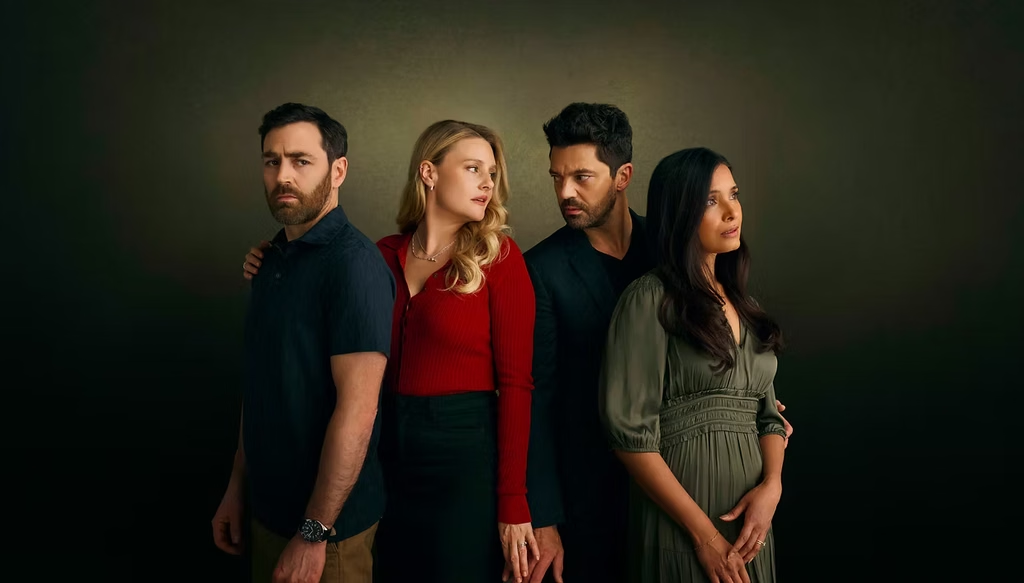
Here’s everything you need to know about Adultery Season 1 (2026), the gripping ITV original drama, including its premiere date, streaming platform, complete episode guide, and full cast lineup. Discover how to watch all six episodes on ITV1 and ITVX in the UK, plus a step-by-step guide to streaming the series from the US. Have questions? Drop them in the comments below, and I’ll be happy to help you find the best way to watch Adultery online.
How can I watch Adultery Series 1 in the US on ITVX?
To watch Adultery Season 1 (2026) on ITVX (formerly ITV Hub) from the US, use a reliable VPN and connect to a UK server to obtain a British IP address. Then visit the official ITVX website, sign in to your free account, and search for Adultery to stream all six episodes online. A VPN can help you access UK-based streaming services while abroad, although ITVX may still apply regional restrictions.
- Subscribe to NordVPN
- Install the VPN app on your device.
- Connect to a UK-based server.
- Visit the ITVX website, then sign in or create a new ITV account. During registration, you’ll be asked for a UK postcode — if you don’t have one, you can use an online UK postcode generator.
- You are all set to watch Adultery (2026) restriction-free!
Adultery (2026) Synopsis
Adultery follows Tom Kirkman, a married father whose 15-year-old daughter, Jess, begins dating her schoolmate Ollie. When Tom unexpectedly meets Ollie’s mother, Beth Brookes, an irresistible attraction develops between them. Despite their marriages to Hannah and Neil, Tom and Beth begin a passionate secret affair that threatens everything they have built. Meanwhile, their teenage children remain unaware of the dangerous connection growing between their parents. As the relationship deepens, lies, guilt and betrayal create emotional turmoil across both households. The story also explores grief, social class, parenthood and the influence of social media, revealing how personal choices can affect everyone around us. With shocking revelations and painful decisions ahead, Tom and Beth must confront whether their forbidden love is worth destroying their families.
When Does Adultery Premiere?
Adultery Season 1 premieres on Sunday, October 25, 2026, at 9 PM on ITV1. All six episodes become available on ITVX the same day.
Cast
- Dominic Cooper – Tom Kirkman
- Romola Garai – Beth Brookes
- Shelley Conn – Hannah Kirkman
- Matthew McNulty – Neil Brookes
- Leila Khan – Jess Kirkman
- Johnny Sanpher – Ollie Brookes
- Andrew Knott – Dave
- James Murray – Paul Kirkman
- Charley Webb – Leah Kirkman
- Penelope Jones – Daisy
- Ntombizodwa Ndlovu – Sara
- Jack Deam – Douglas Wells
- Sue Frumin – Mrs. Bailey
- Keith Lomas – Train Passenger
- Megan Morgan – Alesha
- Gloria Adereti – Headmistress
- Tina Louise Roberts – Diner
- Dana Haqjoo – Mr. Parsons
- Neil Ashton – Mr. Wainwright
- Eryn Davies – Frankie
- Jean-Pascal Heynemand – Friend of Alison
How Many Episodes Does Adultery Season 1 Have?
Adultery Season 1 consists of six episodes.
Episode Guide:
- Episode 1 – 48 minutes: Jess and Ollie’s teenage romance brings their families together. An unexpected meeting between Tom and Beth sparks a dangerous attraction.
- Episode 2 – 46 minutes: Tom and Beth struggle with their growing feelings while helping their children. Hannah demands consequences for the teenagers’ actions, potentially threatening her marriage.
- Episode 3 – 45 minutes: Tom and Beth take their relationship further during a weekend getaway. However, their time together forces Tom to confront a painful truth.
- Episode 4 – 46 minutes: Beth struggles under the pressure of supporting Neil through his trial. Meanwhile, Tom’s guilt pushes him into even deeper deception.
- Episode 5 – 46 minutes: The teenagers’ behaviour forces Hannah to reveal painful memories from her past. Beth also confronts her history as difficult choices approach.
- Episode 6 – 51 minutes: Jess delivers a shocking revelation that changes everything. Tom and Beth must finally face the consequences of their affair and decide what their future holds.
Can I download Adultery Season 1 for offline viewing?
Yes, ITVX Premium supports offline downloads on compatible iOS and Android smartphones and tablets, although download availability for Adultery Season 1 depends on licensing restrictions. If a download option appears beside an episode, subscribers can save it and watch without an internet connection. Downloads remain available for up to 7 days, with 48 hours to finish watching once playback begins. Free ITVX accounts do not support offline downloads.
How to Sign Up for ITVX:
| Step | Instructions |
|---|---|
| 1. Visit ITVX | Go to the official website: www.itv.com. |
| 2. Sign Up | Click Register or Sign Up. |
| 3. Enter Details | Provide your name, email address, and date of birth. |
| 4. Create Password | Set a secure password for your account. |
| 5. UK Postcode | Enter a valid UK postcode when requested. |
| 6. Complete Registration | Accept the required terms and verify your email if prompted. |
| 7. Start Watching | Sign in, search for Adultery, and stream all six episodes for free with ads. |
Trailer
The trailer for Adultery has been released.
FAQs
- Is Adultery based on a true story?
No, Adultery (2026) is a fictional British television drama created by BAFTA-winning writer Danny Brocklehurst. Although the story explores realistic themes such as infidelity, marriage, grief and family conflict, it has not been presented as an adaptation of actual events. - Who created Adultery Season 1?
Adultery was created and written by Danny Brocklehurst, the BAFTA-winning British screenwriter known for Fool Me Once, Brassic and The Stranger. - Where was Adultery filmed?
Adultery Season 1 was filmed in Manchester and surrounding areas of North West England.
You May Also Check This Out
When you make a purchase through links on our site, we may earn an affiliate commission at no additional cost to you. Learn more about how this works.


GIPHY App Key not set. Please check settings